Share it anywhere
A link to copy, a QR code, a printable PDF poster — or send it straight by email or WhatsApp: your customer pays wherever the conversation is happening.
An amount, a description — share the link or the QR code and get paid by card, or, on a single-use link, in cash at an agency. No website needed.
A link to copy, a QR code, a printable PDF poster — or send it straight by email or WhatsApp: your customer pays wherever the conversation is happening.
Card payment with 3-D Secure, or — on a single-use link — a reference paid in cash at a partner agency: the link switches to “Paid” instantly.
24 hours, 7 days, 30 days, never, or an exact date: you decide how long each link lives.
Save your customers and their contact details: reuse them for your next links and subscriptions.
Every link has a clear status — active, paid, cancelled, expired — and you are notified on payment.
Adjust the design of the page your customers see from your account settings.
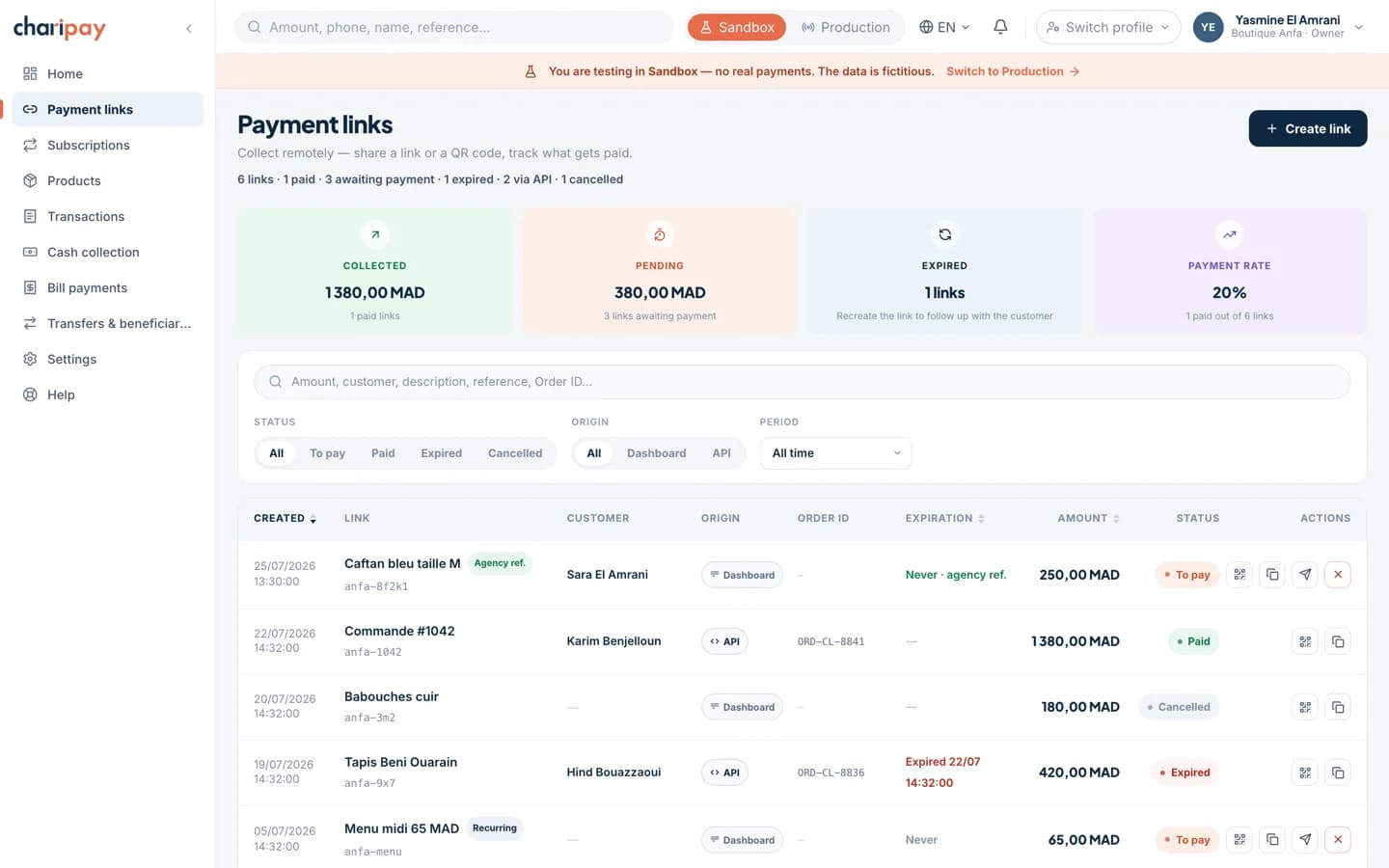
Every link you create shows up here with its status, its origin — dashboard or API — and its expiry. One click for the QR code, another to resend it by email.
Real screenshot of the portal. Amounts, names and references are fictional — the screen is the one you will get.
Not all your customers have a bank card. With agency payment — a ChariPay exclusive in Morocco — they generate a reference and pay in cash at an agency of the largest cash payment network in Morocco — Damane Cash, Chaabi Cash, Tasshilat, Barid Cash and the Chari network: you are notified immediately, the link switches to “Paid”, and the amount is available in your account the instant the deposit is made.





Generate a QR code or a print-ready PDF poster for your counter: your customers scan and pay. The same link lives online and at your point of sale.
An amount, a short description — the link is ready.
Link, QR code, poster — or send it straight by email or WhatsApp.
Real-time status, receipt — and the money available in your account instantly.
A link goes where the sale already happens: in the shop, in a private message, over the phone.
Instagram & WhatsApp commerce
A customer asks about an item in a private message; the merchant creates a link for the exact amount and sends it in the thread. The payment replaces the bank transfer confirmed by screenshot and the cash-on-delivery order a customer can still refuse at the door — the order ships already paid.
Services & independent professionals
Architect, caterer, photographer: a deposit link sent with the quote, a balance link sent on delivery. Every payment carries its reference, and month-end reconciliation happens in the portal — not on a hand-annotated bank statement.
Associations & events
A tournament registration, an annual membership, gala tickets: the same link, printed as a QR code on the poster, collects from every participant. The portal lists who paid, when, and how much — no spreadsheet to maintain.
No — that is exactly what they are for. The link is created from the ChariPay portal and shared by WhatsApp, SMS, email or QR code. The payment page is hosted by ChariPay and opens in the customer's browser.
Both exist: a single-use link for a specific order, or a reusable link to collect from several customers for the same amount — a membership fee, a ticket, a flagship product. Cash payment at an agency, however, always relies on a single-use link — one reference per deposit.
They open the link, see the amount and your business name, and pay by card with 3-D Secure authentication — or choose cash: they receive a reference, deposit the amount at a Damane Cash, Chaabi Cash, Tasshilat, Barid Cash or Chari agency, and the link flips to “Paid” the moment the cash is deposited. For a card, you are notified immediately — in the portal, and by webhook if you have one configured; for cash, you are notified in the portal as soon as the network confirms the deposit, and the link's state can also be read through the API.
Yes — every link carries an optional expiry date. Once it passes, the page tells the customer the offer is no longer available, and no payment can go through.
Try it yourself: test mode opens as soon as you create your account. Or tell us about your business — our team will walk you through it on a real-world case.